WooCommerce
WordPress
WooCommerce conversion tracking fixes for GA4, GTM, Meta, and Google Ads
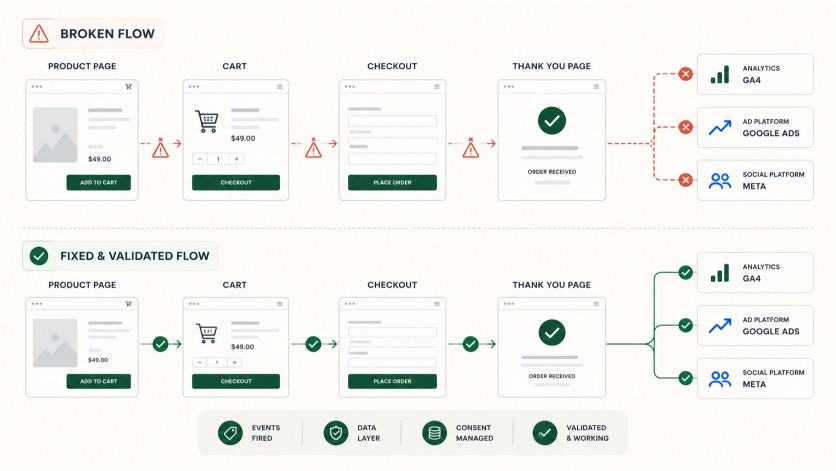
WooCommerce tracking failures usually sit around event timing, dataLayer state, thank-you page logic, duplicate tags, or browser/server deduplication. The fix starts by proving where the event path breaks.
When this usually happens
Common triggers
- after checkout plugin changes
- after GTM container edits
- after consent banner changes
- after Meta or Google Ads setup changes
- after theme or thank-you page customization
- after caching checkout or account pages incorrectly
Common causes
Where the failure path often sits
- purchase event not firing
- add_to_cart missing
- initiate_checkout missing
- thank-you page logic unreliable
- duplicate events
- dataLayer missing ecommerce parameters
- Meta Pixel/CAPI deduplication issue
- GTM trigger fires too early or not at all
What I check first
The first checks stay close to the symptom
GTM container installation and duplicate tags
checkout and thank-you event sequence
dataLayer ecommerce payloads
GA4 DebugView state
Meta Pixel and CAPI deduplication
Google Ads conversion action diagnostics
First sprint scope
What the first sprint includes
- trace the event path from product to purchase
- fix safe trigger, tag, dataLayer, or plugin configuration issues
- identify duplicate browser/server event paths
- verify the event in the relevant platform
Verification
How the fix is checked
GTM Preview
GA4 DebugView
Google Tag Assistant
Meta Test Events
Google Ads diagnostics
test order when allowed
What I need from you
Useful intake details
- store URL
- affected conversion actions
- test product or test order permission if available
- GTM/GA4/Meta/Google Ads access
- what changed recently
What is not included
Scope boundary
- ad strategy
- feed optimization
- CRO redesign
- checkout rebuild
- lifetime tracking maintenance
Price anchor
Small diagnostics usually start around $350. Focused WordPress technical sprints usually land between $650 and $1,500+.
See pricing bandsRelated WordPress problems
First sprint intake
Send the URL, the exact symptom, and what changed recently.
A useful first message includes the WordPress URL, affected pages, recent changes, plugin stack, and which tools you can grant access to.